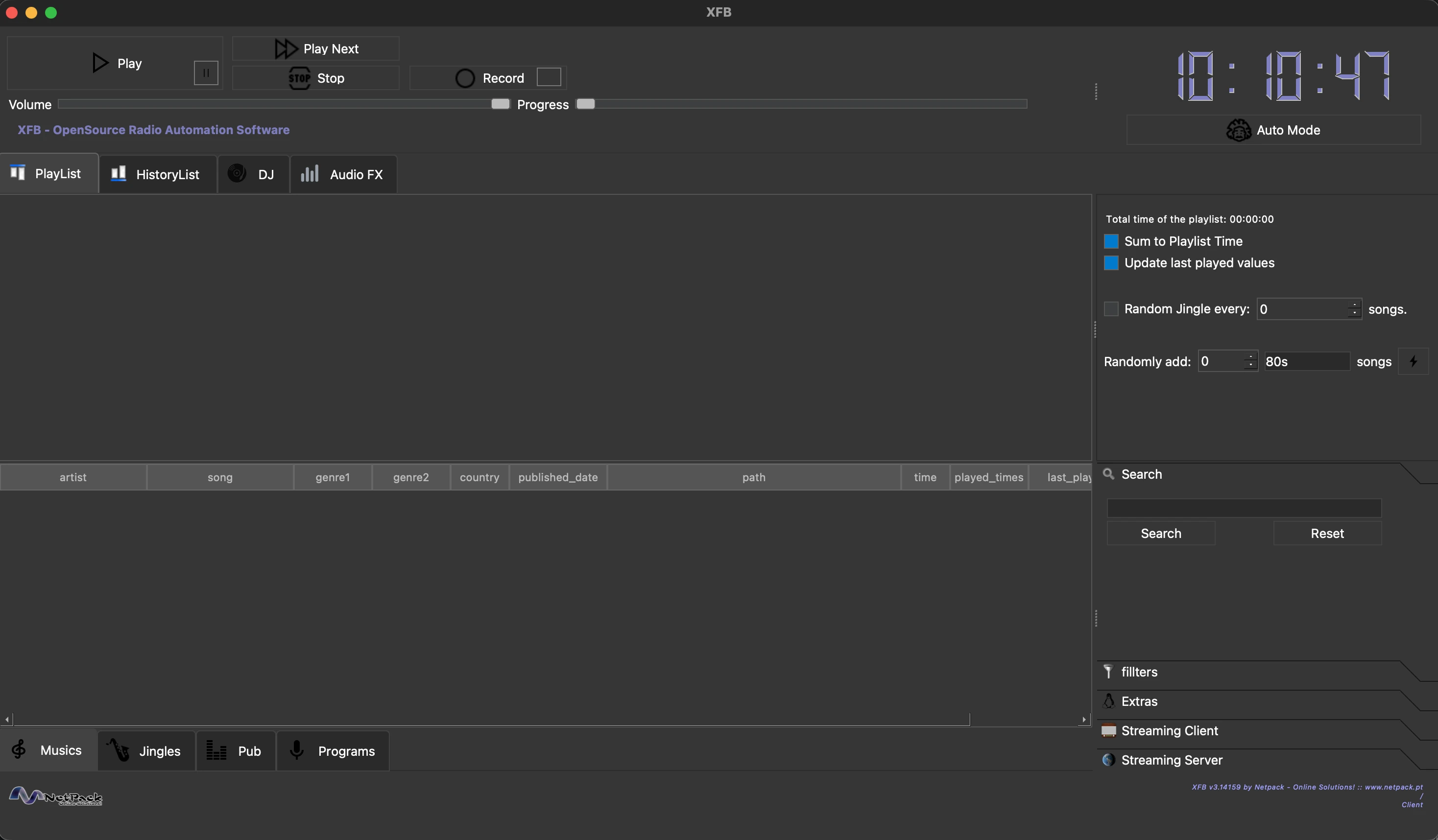




XFB is an open-source radio automation software developed by Frédéric Bogaerts at Netpack Online Solutions.
- Database Management — Catalog and organize music, jingles, advertisements, and programs
- Automated Scheduling — Create schedules for music playback, ad slots, and program airing
- Drag & Drop Playlist — Drag tracks from the music library directly into the playlist
- Wave View & Auto-mix — See each track's waveform in the playlist and drag it to start before the previous one ends; Auto-mix computes every crossfade so each track begins where the last goes quiet
- BPM & Tempo-Matched Auto Mode — Measure the tempo of your library, then have Auto Mode follow each track with one at a similar BPM (half and double time count as a match), with a configurable tolerance
- Gapless Playback — The next track is preloaded and handed over without a gap
- Multi-Player — Main player plus two auxiliary LP players for DJ mixing
- Pads (cart wall) — A grid of labelled, coloured pads that fire a jingle, a stab or a bed the moment you press them, built for a touch screen. Load a pad by dragging a track onto it, picking one from the database or choosing any file on disk; each pad has its own volume, can loop, and can either stop or restart when pressed again. Eight banks, and pads playing on one bank keep going while you work on another.
- Audio FX — Per-player 10-band equalizer (with presets) and broadcast-style compressor, applied live (XFB → Audio FX, requires ffmpeg)
- 432 Hz Playback — Retune everything from A=440 to A=432 in real time without touching your files, or batch-convert one track, a selection, or the whole library (Database menu / music table right-click)
- Live Recording — Record programs directly within the application
- Streaming Client — Listen to any Icecast/Shoutcast stream or .m3u/.pls playlist from within XFB (with automatic reconnect), e.g. to monitor your station's output
- Torrent Search — Search music via Tor-routed onion sites (searching is anonymised; the BitTorrent download itself is not — your IP is visible to peers)
- Accessibility — Screen reader support (ORCA, VoiceOver, NVDA), full keyboard operation, spoken status announcements, audio feedback, braille display output via BrlTTY, and a built-in tutorial for blind operators (Help menu)
- Themes — Light, Dark, Midnight and Studio, or follow the system setting, with a configurable accent colour
- Languages — English, Portuguese and French (Options → Language)
- Cross-Platform — Runs on macOS, Linux (Debian/Arch), and Windows
Option A — Homebrew (recommended):
brew install --cask netpack/xfb/xfbThis installs XFB.app into /Applications together with ffmpeg (required by the
audio FX engine). Upgrade later with brew upgrade --cask xfb — or simply use
the in-app update notification.
Option B — Manual:
- Download
XFB-3.1416-macOS.dmgfrom GitHub Releases - Open the DMG file
- Drag
XFB.appinto your Applications folder - Launch XFB from Applications (first launch: right-click → Open to bypass Gatekeeper)
Requirements: macOS 11.0 (Big Sur) or later, Apple Silicon
# Download and install the .deb package
sudo apt install ./xfb_3.1416-1_amd64.deb

# Or if dependencies are missing:
sudo dpkg -i xfb_3.1416-1_amd64.deb
sudo apt install -f
Requirements: Ubuntu 20.04+ or Debian 11+, Qt6 runtime libraries
# Using yay
yay -S xfb

# Or using paru
paru -S xfb

# Or manually
git clone https://aur.archlinux.org/xfb.git
cd xfb
makepkg -si- Download the installer from GitHub Releases:
- Intel/AMD 64-bit:
XFB-3.1416-Setup.exe - ARM64 (Windows on ARM, e.g. Snapdragon):
XFB-3.1416-arm64-Setup.exe
- Intel/AMD 64-bit:
- Run the installer and follow the prompts
- Launch XFB from the Start Menu or Desktop shortcut
Requirements: Windows 10 or later (64-bit Intel/AMD or ARM64)
Option A — Manual:
- Drag
XFB.appfrom Applications to the Trash - Optionally remove config:
rm -rf ~/Library/Application\ Support/Netpack\ -\ Online\ Solutions/XFB
Option B — Script:
./uninstall-macos.shThis removes the app, configuration, cache, and Tor data. Your music library is preserved.
# Remove the application (keeps configuration)
sudo apt remove xfb

# Remove everything including configuration
sudo apt purge xfb# Remove the package
sudo pacman -R xfb
# Remove with unused dependencies
sudo pacman -Rns xfbUser configuration in ~/.config/XFB/ is preserved. Remove manually if desired.
- Installer version: Use "Add or Remove Programs" in Windows Settings, or run
Uninstall.exefrom the install directory - Portable version: Run
uninstall-windows.batthen delete the XFB folder
User data in %APPDATA%\Netpack - Online Solutions\XFB is preserved.
- Add music to the database via Database → Add a single song or Database → Add all songs in a folder
- Browse your music library in the Musics tab at the bottom
- Drag and drop a track from the music table onto the Playlist tab
- Or select a track and press Enter to add it to the end of the playlist
- Or right-click a track and choose Add to the bottom of playlist / Add to the top of the playlist
- Click Play to start playback from the playlist
- Use the Auto Mode button to enable automatic advancement through the playlist
- The progress slider shows current position; the volume slider controls output level
- Wave view shows each track's waveform so you can drag a track to start before the previous one ends; Auto-mix sets those crossfade overlaps for you
The Pads tab, next to DJ, is a cart wall: a grid of buttons that play a sound the instant you press one, without going near the playlist. It is meant to be driven with a finger on a touch screen.
- Fill a pad by dragging a track onto it from the music, jingles, adverts or programs tables — or turn on Edit pads (or right-click a pad) and choose Library... to search the database, or File... to take any file on disk
- Give it a label and a colour in the same dialog, so the grid reads at a glance
- Press a pad to play it, press it again to stop — or set it to restart from the top instead, which is what a stab or a stinger wants
- Loop until stopped keeps a bed running under a live link
- Pads are polyphonic: each one plays on its own, so a stinger over a bed is fine. Stop all cuts everything
- Banks hold separate sets of pads (sweepers on one, beds on another). A pad playing on one bank keeps playing while you work on another
- Grid size, volume, banks and every pad are saved as you go
- From the keyboard: Tab into the grid, arrow keys to move around it, Enter to play or stop, Esc to stop, F2 to edit a pad
XFB can be operated without a mouse. These work anywhere in the application, whatever currently has focus, and are also listed in the Playback menu.
On macOS press Cmd wherever the table says Ctrl (the menus show ⇧⌘P, ⇧⌘S, …).
| Action | Shortcut |
|---|---|
| Play / Segue | Ctrl+Shift+P |
| Pause / Resume | Ctrl+Shift+Space |
| Stop | Ctrl+Shift+S |
| Next track | Ctrl+Shift+N |
| Previous track | Ctrl+Shift+B |
| Add selection to end of playlist | Ctrl+Shift+Enter |
| Add selection to start of playlist | Ctrl+Alt+Enter |
| Announce what is playing | Ctrl+Shift+W |
| Accessibility Preferences | Ctrl+Shift+A |
| Tutorial for blind users | Ctrl+Shift+H |
Inside the music, jingles, adverts and programs tables, Enter adds the track you are on to the end of the playlist — the quickest way to build a running order. Tab and Shift+Tab move between the panels.
If you only remember three: Enter to build the running order, Ctrl+Shift+P to go on air, Ctrl+Shift+W to hear what is playing.
- C++17 compiler (GCC 9+, Clang 10+, MSVC 2019+)
- CMake 3.16+
- Qt6, required: Core, Gui, Widgets, Concurrent, Multimedia, Sql, Network, Test
- Qt6, optional: WebEngineCore, WebEngineQuick, QuickWidgets — linked only when your Qt provides them. Qt ships no WebEngine for Windows on ARM64, which is why these are optional; the build configures fine without them.
Building against Qt 6.4 is what the Debian package targets (bookworm), so
keep new code within that floor — a macOS build on a newer Qt does not prove the
Debian package still compiles. Run ./build-deb-docker.sh before a release.
brew install qt@6 cmake
git clone https://github.com/netpack/XFB.git
cd XFB
./build-macos.shsudo apt install build-essential cmake qt6-base-dev qt6-multimedia-dev qt6-webengine-dev libsqlite3-dev
git clone https://github.com/netpack/XFB.git
cd XFB
./build-deb-no-tests.shREM Requires: Qt6 (MSVC), CMake, Visual Studio 2022 Build Tools
REM x64 (default)
set QT_DIR=C:\Qt\6.8.3\msvc2022_64
build-windows.bat
REM ARM64 (Windows on ARM). Best built natively on an ARM64 machine.
set QT_DIR=C:\Qt\6.8.3\msvc2022_arm64
build-windows.bat --arch arm64To cross-compile ARM64 on an x64 machine, install the ARM64 MSVC build tools
plus both an x64 and an ARM64 Qt, then point QT_HOST_DIR at the x64 Qt so
windeployqt can run while deploying the ARM64 libraries:
set QT_DIR=C:\Qt\6.8.3\msvc2022_arm64
set QT_HOST_DIR=C:\Qt\6.8.3\msvc2022_64
build-windows.bat --arch arm64The packaging scripts above all configure with BUILD_TESTING=OFF, so they
produce release artifacts without building the test targets. Run the suite
separately:
./run-tests.sh          # build and run
./run-tests.sh --list   # show which tests are skipped as known broken
./run-tests.sh --all    # include those too (expect failures)
CI runs ./run-tests.sh on every push, so a test added under tests/ is
exercised automatically. A number of older tests assert behaviour the code does
not have, and the integration, performance and UI groups do not currently
compile; both sets are listed in the script and skipped until they are fixed.
You do not have to install any of these yourself. The first time you use a feature that needs one, XFB tells you what it needs and why, asks permission, and installs it for you through your platform's package manager (Homebrew, apt, pacman or winget). Nothing is installed at startup, and nothing is installed without you agreeing to it — so a station that never touches, say, the Torrents tab never gets a Tor client.
| Tool | Needed for |
|---|---|
ffmpeg |
The FX engine, waveforms, BPM detection, 432 Hz playback, format conversion (bundled on Windows and macOS) |
tor |
Anonymous torrent search via onion sites |
aria2c (or transmission-cli) |
Torrent downloading |
yt-dlp (with node) |
Downloading media from online sources |
exiftool |
Automatic track duration detection |
mediainfo |
The music table's "Get media info" action |
audacity |
The "Open this in Audacity" action |
Options → Install all dependencies fetches the lot in one go if you would rather have everything ready in advance.
orca is different: it is the Linux screen reader you run, not something XFB
launches. XFB speaks through whichever screen reader is already running — ORCA
on Linux, VoiceOver on macOS, NVDA on Windows — so install it the usual way for
your desktop.
XFB is free and open source, and always will be. If it is useful to you or your station, you can support its continued development through GitHub Sponsors. Sponsorships fund the time spent on new features, cross-platform packaging, and keeping the project maintained.
- Open an issue on GitHub
- Email: [email protected]
- Website: netpack.pt
XFB is licensed under the GNU General Public License v3.0. See the LICENSE file for details.
Made with ❤️ by Frédéric Bogaerts @ Netpack - Online Solutions